|
V5.8 Upgrade Steps for current users of PI Helper 5-20-2003
|
Do not use the
old PI Helper shortcut.
|
|
|
The New PI Helper
shortcut is this:
|

|
|
|
|
|
|
Current Users: Please follow the instructions below in the event that
you evaluate the upgrade and decide to NOT to purchase the upgrade of PI
Helper
-
Make a complete backup of the current PIHelper
folder.
-
Download Version 5.8 and install it in the same directory as the current
version.
-
Follow the upgrade instructions presented here.
-
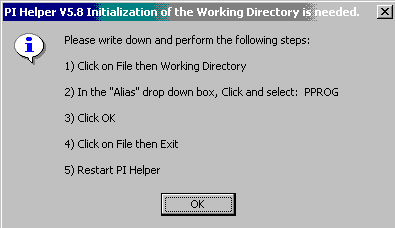
When PI Helper starts up for the first time the following dialog box will
appear. Follow the instructions presented.
|
|
|
 |
|
|
-
Once PI Helper is started for the second time a box will appear asking if
you have backed up the PI Helper. If you have done so, then Click on
the Yes button.
-
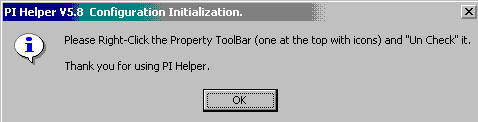
Another dialog box, shown below, will appear telling you to turn off the
Property toolbar.
|
|
|
 |
|
|
-
The Property toolbar is shown below. Move your mouse over the tool
bar, Right-Click and Uncheck it.
|
|
|
 |
|
|
|
|
|
-
PI Helper then will then complete the upgrade process and
open normally.
If after the evaluation period you decide against purchasing the
upgrade, then do the following:
-
Copy the current version of PIHelper to a save directory,
say, PIHelper58.
-
Uninstall PI Helper version 5.8. Follow the uninstall
instructions.
-
Next, reinstall Version 5.4 as a new user. (fresh
install) [Do not do anything yet with the saved Version 5.4]
-
Run the new Version 5.4 install one time and exit.
-
Locate the PData folder under the new install and delete it.
(.. PIHelper\PData)
-
Take the PData folder from the saved, Version 5.8 (ex.
PIHelper58 folder) and paste it under the PIHelper folder.
-
Restart PI Helper normally, with the old shortcut (icon)
-
Go to the System notepage of the Setup form.
Email the Serial Number to support@pihelper.com
Request re-Authorization of Version 5.4
-
Follow any instructions that are returned with your new key.
|
|
|
Back to
Top
|
|
|